

Are your residents missing out on important information in the society? To prevent the loss of crucial society updates, use Mygate Notice board, a single medium of communication for your community, and a source of truth for the residents.
- Send all critical announcements via a single medium of communication
- Avoid loss of crucial information on chat groups and emails
- Make verified information available to all residents
- Skip walking to the traditional notice board with paper notices
How it works?
1. Management committee
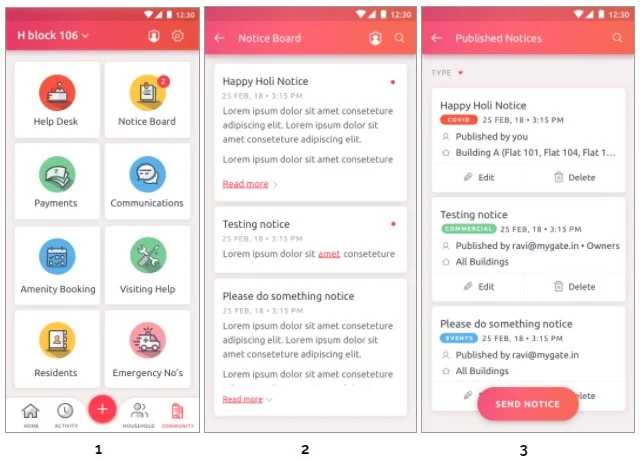
The society admin now has the flexibility to broadcast notices directly via the app. Steps:
- Select the ‘Community’ tab on your home screen
- Tap on ‘Notice Board’. The notices you see are now for your flat
- To view or send society notices, click on the admin icon at the top right corner
- View published notices or click on the ‘SEND NOTICE’ button to create a new one
- Add a title and a notice description
- Select buildings and flats to send out the notice to
- Select ‘RESIDENT TYPE’ and hit the ‘SEND NOTICE’ button
2. Residents
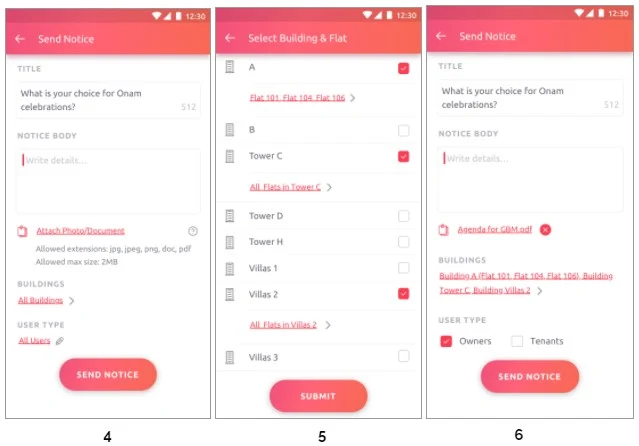
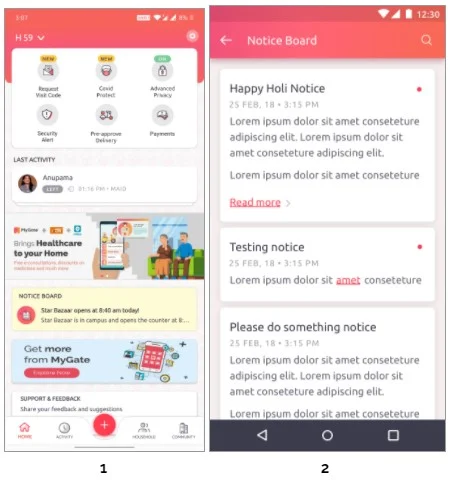
Once the feature is enabled in your society, you can check the ‘Notice Board’ card on the ‘Homescreen’ or under the ‘Community’ tab for all recent and past communications.
Enable this feature for your society and get an authorised platform for community-wide broadcasting.
Contact your management committee or Mygate relationship manager to enable Notice Board for your society today!
In these uncertain times, associations are doing their best to help the society residents in every way possible. One of them is sharing a list of emergency contacts among the residents to help them find quick assistance in the times of absolute need. However, in most cases, this information is broadcasted via WhatsApp or other such channels and is at the risk of getting lost/unnoticed.
MyGate’s Emergency Numbers feature is helping society associations in making this list available for the residents right on the user app. Over 3000 societies are using this feature to create a single directory and ensure the residents find instant help when needed.
This feature doesn’t require separate enrollment. In order for the contacts to appear on the user app, admins are required to populate them through the MyGate dashboard.
Some of the critical contacts that you could add:
– Main gate security guard
– Nearest emergency services
– Members of the committee
How to add contacts
Step 1: On your MyGate admin dashboard, Click on People Hub and scroll down to Emergency Contacts

Step 2: Click on Add Emergency Contact to list all necessary emergency numbers on the user app.

Step 3: Choose the type of the emergency contact and enter the required details.

Step 4: Click on Save to complete

Contact your management committee or MyGate relationship manager to enable Emergency Contacts for your society today!
Got a leaky faucet and don’t know a good plumber? Looking for a carpenter for some urgent woodwork? If your community is on MyGate then there’s no reason to worry about.
The Local Services feature on the MyGate app helps you find the right service provider nearby such as maid, cook, plumber, carpenter, driver, milkman and more, without any hassle. You can also get a separate list of who among them are inside the community at any given time using the ‘Inside’ filter.
Here’s how the feature helps you:
- View a list of the best local services in your area
- Check individual reviews and ratings
- Choose to call them directly via the app
- Apply the ‘Inside’ filter to know who among them are inside the premises
How it works:
1. Open the MyGate app
2. Go to the Community tab
3. Click on the Local Services card
4. Pick the type of service you are looking for
5. Service providers who work in your community are listed
6. To view who is inside the community, check the ‘INSIDE’ filter on the top right corner
7. Click on the cards to view individual contact details, ratings & reviews
8. You can also view if they work in other houses in your community and their available time slots


With MyGate, you never have to hustle to find the assistance you need. Not only that, it also helps you make informed decisions.
Contact your management committee or MyGate relationship manager to enable Local Services for your society today!
Starting in April of 2019, the Government India planned to replace all of the country’s existing meters with smart prepaid meters. The topic was again touched upon during the Budget Discussion 2020. This initiative improves billing and collection and is a step in the direction of providing electricity for all. Many residential societies have already introduced the prepaid meters in their community and many more are in the process of doing so.
Benefits include:
- Consumers can choose their own service provider and rate as per their requirement
- Saves cost on manual metering, billing and collection
- Consumers can track their electricity use and plan their power purchase better
- Recharging your power can be done digitally and instantly
- Power thefts can be easily spotted and prevented
Mygate aims to make community life as smooth as possible by offering necessary assistance in one place. With our new ‘Prepaid Meter’ feature, residents can track their electricity consumption and recharge their installed meters. Mygate has partnered with leading meter vendors such as Crystal , Elmeasure and Radius. Any society that has installed meters from these service providers will have this feature automatically enabled on their Mygate app.
How it works
1. Click the ‘Community’ icon on your shortcuts
2. Click on the ‘Prepaid Meter’ icon
3. You will now be able to see your power usage for the month
4. You can click on any transaction and see the breakdown of how many EC, DG and CAM units of power were consumed
5. Click on the ₹ on the top right corner or on the ‘Add Money’ button on the bottom if you need to recharge your prepaid meter
6. Click on any of the payment options to recharge your meter
7. Once you have clicked on your desired option and completed the payment, you will see a pop up displaying the ‘Payment Successful’ message and details of your transaction. If you click on the ‘I have paid by Cheque/Cash/EFT’ option, you must make this payment to your management committee and the society admin will be notified and take care of the payment process
8. To see your meter details such as Meter Number, EC and DG charges etc., you can click on the ‘Settings’ icon on the top right corner.


This feature allows you to recharge your meter easily, budget your electricity expenses and monitor your power usage. With this new service, Mygate endeavours to make this transition to a smarter future seamless and effortlessly.
Contact your management committee or Mygate relationship manager to enable Prepaid Meter for your society today!
Do you often have to wait in long queues to use an amenity in your clubhouse? With MyGate Amenities’ Booking, you can now directly book slots on the app and enjoy the clubhouse amenities with zero wait time.
Benefits of Amenities’ Booking
- Book your slot directly on the app
- Use amenities without worrying about unauthorized visitors
- Get easy access to the clubhouse amenities with a 6-digit passcode
- Enjoy easy access to amenities with zero wait time
- Benefit from a fair and transparent booking mechanism
….and much more!
How to book an Amenity?
1. Go to the Community tab on the MyGate app and click on Amenities. You can view your previous bookings here
2. To book a new slot, click on BOOK AMENITY and select the category (paid or free)
3. Select the date and time slot.
4. Click on PROCEED TO PAY
5. Make payment using our several payment gateway options such as UPI, net banking, credit card, etc.
6. Click on PAY, to confirm your slot.


What’s new?
During these unprecedented times, admins have to be even more careful in keeping the societies safe and so MyGate has made an update for residents booking their access to clubhouse amenities on the MyGate app.
– Admins can make the attachments mandatory for amenity booking
– Documents include ‘corona-free’ health certifications for residents
– Residents have to attach documents while booking an amenity
Society management can also ensure that only residents and their guests are allowed to use the clubhouse with MyGate’s Clubhouse Entry feature. It allows them to understand the utilization of the facility and provides details in case of misuse of any equipment or a dispute. The management committee also has the option of restricting any resident’s entry into the clubhouse.
Contact your management committee or MyGate relationship manager to enable Amenities’ Booking for your society today!
Keeping a record of documents, managing and procuring them is time-consuming and a hassle for both society residents and committee members. Mygate has introduced Documents management to solve this issue and make life easier for residents, house owners and management committee members.
Benefits of Documents management
- Residents can store a variety of documents such as rent agreements, identity proofs, house rent receipts, ownership records and more
- Admins can store a variety of documents such as vendor agreements, RWA minutes of meeting, society entry records and more
- Store a number of documents of any file size
- Upload documents in bulk like multiple rent receipts for multiple tenants
- Upload all standard file types such as PDFs, Xls, PNG, JPEG, CSV
- Create multiple folders for different files and update them when necessary
There are 4 categories of storage for different members of the community:
| Category | Document type | Who can upload/edit | Who can view |
| Society | Documents created for society wide use, such as rules, society wide documents, information to all residents, RWA minutes of meetings (can be uploaded from meetings module), etc | Management committee members /society admins & roles with communication admin permissions only | Can be configured- Tenants and owners only. Staff members cannot view these documents |
| Management | Documents created specifically for management committee use – could be vendor agreements, management committee MoMs etc | Management committee members /society admins & roles with communication admin permissions only | Only the society admins |
| Flat | Documents created specifically for tenancy agreements & management , upcoming – ownership and other flat doc uplaods | Only the members of the flat & the society admins & member with tenant management permissions | Only the residents of the flat & the society admins |
| Personal | Any personal documents that you want to keep handy | Only the particular user | Only the particular user who has uploaded the document |
You can access the document storage ‘Society Dashboard’ under Communications

Contact your management committee or Mygate relationship manager to enable Documents for your society today.